The most frequent problem facing many developers who have come up with AI-powered data extraction is the processing times which take between 30-60 seconds per request. This poses serious issues in production code as the synchronous processing of the main thread causes bad user experience and even delays.
Common Challenges:
The processes of AI data extraction that require 30-60 seconds.
Blocking of main application thread.
Risk of request timeouts
Unsatisfactory user experience with concurrent processing.
Requirement of re-try mechanisms and error management.
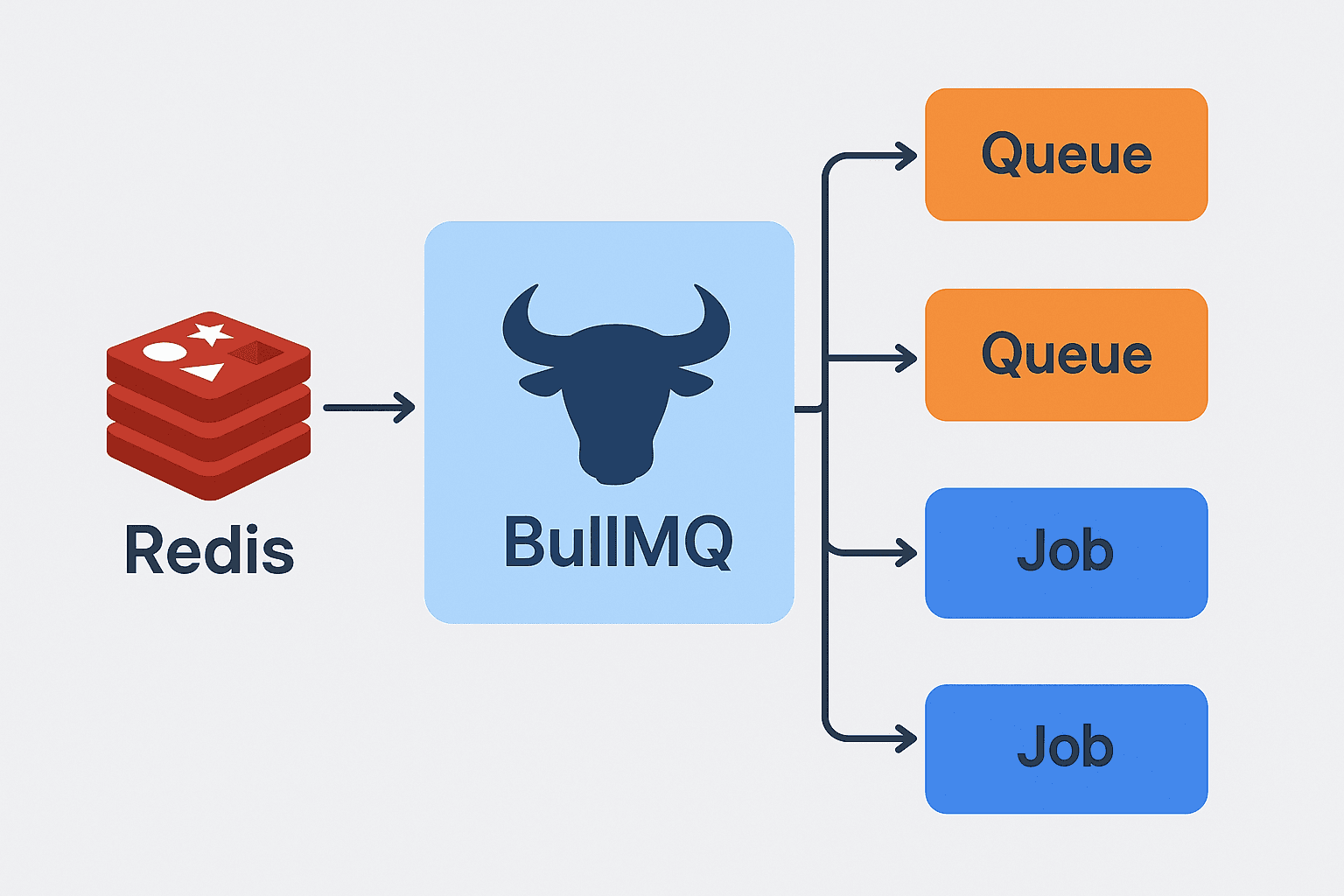
The solution? An Implementation of a Queue Processor. We will be using the BullMQ and Redis as the queue processor.
Why BullMQ? The Technical Decision
BullMQ is distinguished by a number of features that are important in the strong processing of asynchronous processing:
Persistence Redis based: Jobs are not lost on restart of a server.
In-software retry logic: Exponential backoff retry.
Parallel processing: Jobs can be processed by more than one worker at the same time.
Job prioritization: Firstly, critical tasks may be handled.
Progress monitoring: Job monitoring in real time.
Event-driven architecture: Ideal with node.js applications.
Prerequisites and Setup
Install Dependencies
Redis Setup
Run Redis on your system. The easiest approach is Docker:
Or install locally:
macOS:
brew install redisWindows: Install Redis on Windows | Docs
Ubuntu:
sudo apt-get install redis-server
Environment Configuration
Add these to your .env file:
Implementation: Step-by-Step Guide
Let’s walk through transforming a synchronous Node.js process into asynchronous using BullMQ.
Create a Queue Manager
Add Jobs to the Queue
Worker to Process Jobs
Application Integration
In the main application, queue jobs instead of running them synchronously:
Monitor the job status:
Performance Comparison
Watch what happens to the application with the use of async processing. (Before/After comparison or metrics may be inserted here where possible)
Monitoring and Management
Track the jobs through Bull Board. You are able to see waiting jobs, active jobs, completed jobs, and failed jobs, re-try failed jobs, pause the queue, and clean up completed jobs all on a clean dashboard.
Advanced Features and Best Practices
Parallel Job Processing
The application can be scaled by executing more than one worker instance processing jobs in the same queue. The various jobs can be done in parallel by each worker, which has a significant effect on increasing throughput and decreasing processing time of high workload.
Retry Logic and Backoff
BullMQ will automatically re-run jobs that fail with an exponential backoff to ensure that the server is not overwhelmed by temporary failures. You are able to set up the number of attempts and backoff plans to make sure that job processing is resilient.
Troubleshooting Common Pitfalls
Memory Issues
Configure Redis cleanup:
Worker Crashes
Add error handling and alerting in worker:
Job Timeouts
Tune settings for long jobs:
Reference Links
Conclusion
BullMQ with Redis transforms slow, synchronous AI data extraction into fast, scalable, and reliable asynchronous workflows in Node.js. By leveraging parallel processing, retry logic, and real-time monitoring, developers can boost performance, prevent timeouts, and deliver a smoother user experience. Implementing this queue-based approach ensures your AI applications remain efficient, resilient, and production-ready.
Frequently Asked Questions (FAQs)
1. How does BullMQ compare to RabbitMQ or Kafka?
A. BullMQ is ideal in the processing of jobs in Node.js but with easy installation. RabbitMQ is appropriate to the enterprise microservices messaging and intricate routing. Kafka is a high throughput data streaming tool.
Choose based on your use case:
Background jobs: BullMQ
Message brokering: RabbitMQ
Real-time data pipelines: Kafka
2. Do I need Redis installed for BullMQ to work?
A. Yes. In BullMQ, the job persistence and queue management use Redis (version 6.2.0+) as a job persistence and queue management backend. Redis could be run locally or with Docker or managed services such as AWS ElastiCache or Redis Cloud.
3. How can I monitor and manage BullMQ jobs in production?
A. Visual monitoring, with real-time job status, retries and metrics Use Bull Board. Prometheus/Grafana can also be integrated to get production-grade dashboards. Bull Board is easily compatible with Express, Fastify, or NestJS.
4. What happens to jobs if my server crashes?
A. Jobs are persisted in Redis and survive crashes or restarts.
When your application recovers, BullMQ automatically processes incomplete jobs with built-in retry logic and exponential backoff for reliability.